Billing FAQ
Is the billing based per account or per website?
Billing is based on total usage across all the sites in a team. Each team has its own subscription and is billed separately. Check your usage numbers at any time in the Subscription section of your account settings. For details on how usage is calculated, see Choose the right subscription.
Can I manage multiple clients with separate billing for each?
Yes. You can create a separate team for each client, add their sites to the respective team and invite the client to their own team. Each team has its own subscription and billing, so each client can be billed independently. You can be a member of multiple teams using a single Plausible login and switch between them from the menu in the top right of your account. See Teams and roles for details.
Where can I find vendor details and purchasing documents?
See our Purchasing and vendor information page for Plausible company details, Paddle payment-recipient information, tax documents and our standard purchasing process.
How do I get an invoice?
Paddle (our payment processor) emails you an invoice automatically after each payment. You can also open past invoices from your account settings. Paddle opens each invoice in a browser tab, so use your browser's Print command and select Save as PDF to save a copy. See View and save your invoices.
The invoice email goes to your Paddle email address, which may differ from your Plausible login email. To change it, contact us with your current and desired invoice email.
What payment methods do you accept?
Credit/debit card, PayPal, Apple Pay and Google Pay. All payment processing is handled by Paddle. We're not able to accept cryptocurrency.
Paddle automatically emails you an invoice after every payment. Our purchasing and vendor information page covers company details and purchasing documents.
If paying via PayPal, make sure a valid card is linked to your PayPal account. Paddle requires this for recurring subscriptions.
How do I add my VAT number?
If you're purchasing on behalf of a business, click Add VAT number on the second step of the checkout, where you also add your payment details. Paddle handles all sales tax calculations and will apply the correct rate based on your details.
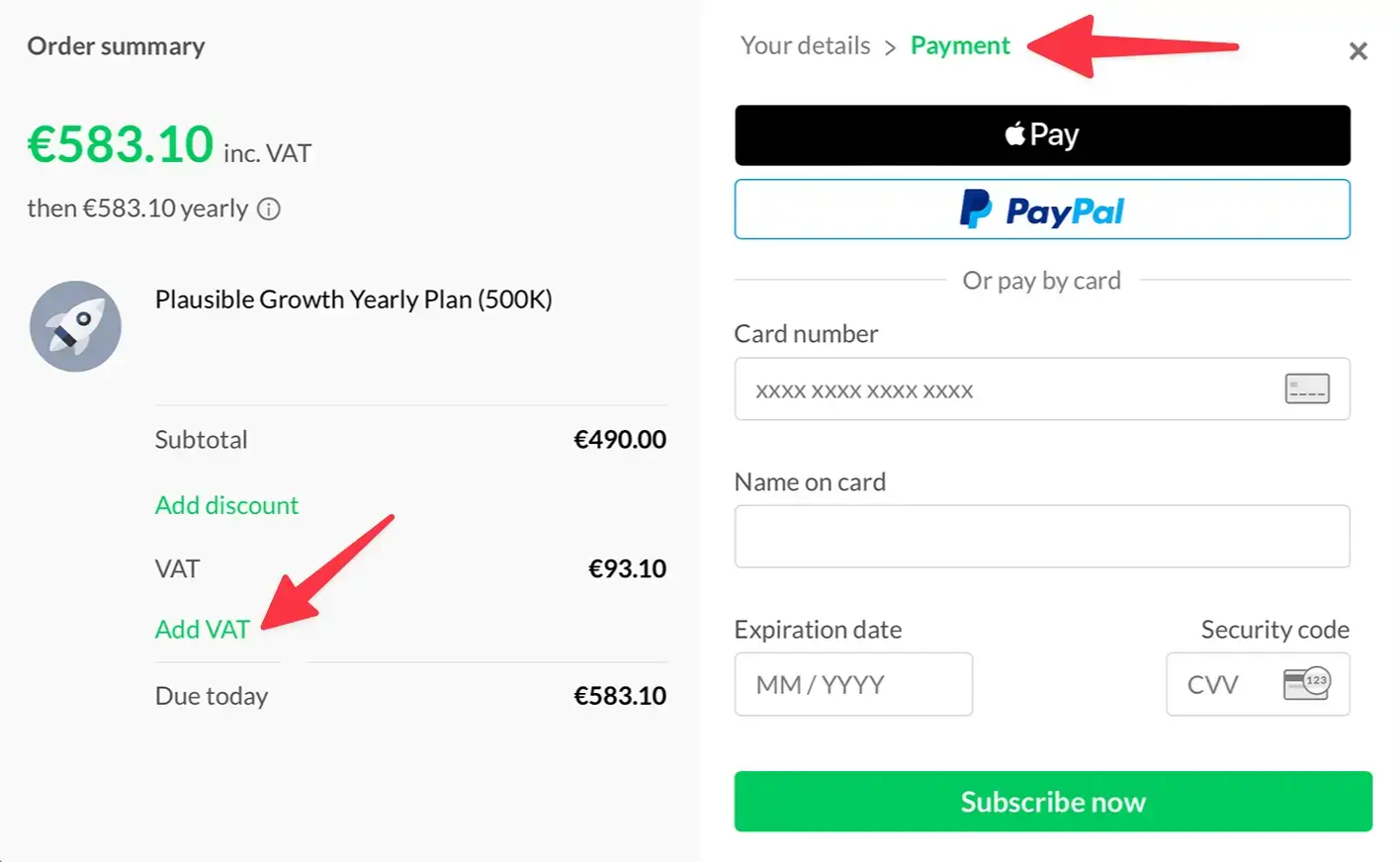
If you missed this step, open any Paddle invoice and click Add address & VAT Number. Paddle will automatically refund the VAT on your original payment and apply the correct rate to future payments. Other invoices that were already issued stay as they were. More on Paddle's VAT handling →
How do I change my VAT number?
Paddle does not allow editing the VAT number on an existing subscription. To update it, let your current subscription run until the end of the billing period, cancel it and resubscribe from the same Plausible account with the correct VAT details. All your Plausible data, sites and settings stay unchanged during this process.
How do I change my billing address?
Open any invoice and click Edit business address to update your street address, city or postal code.
How do I change the country on my subscription?
Paddle does not allow changing the country on an existing subscription due to tax regulations. To switch countries, let your current subscription run until the end of the billing period, cancel it and resubscribe from the same Plausible account with the new country. All your Plausible data, sites and settings stay unchanged during this process.
What happens if I exceed my pageview limit?
No surprise fees. An occasional traffic spike won't trigger extra charges or stop your stats from being counted. A single month over your limit requires no action. If traffic drops back within your tier the following month, nothing happens.
You'll see an early notice in Account Settings → Subscription when you exceed your monthly pageview limit, even before the month ends, or if you exceeded it in the previous month. This is a heads-up so you can plan ahead if higher traffic continues. A single month over your limit still requires no upgrade.
If usage exceeds your tier for two consecutive months, we'll notify you to upgrade. The change is pro-rated so you only pay the difference. If you don't upgrade within a week, your dashboards are temporarily locked. Even while locked, stats continue to be collected in the background and you still have access to your site settings and account settings. Dashboards are automatically unlocked at the start of the next billing cycle if your usage drops back within limits. You can also unlock them at any time by upgrading to the appropriate tier.
If the spike is temporary, you can upgrade to restore access and downgrade again when traffic drops. Downgrades are pro-rated too, so you won't lose out. You're never locked into a higher plan when your usage no longer requires it. This works the same way on both monthly and yearly billing.
If the spike was caused by bot traffic, see what to do about bot traffic. See Choose the right subscription for the full details.
My traffic spiked temporarily. Do I need to upgrade?
A single month over your limit requires no action. If usage drops back within your tier the following month, nothing happens.
If you've been asked to upgrade after two consecutive months above your tier, you have two options. If your traffic has already returned to normal, do nothing: your dashboard will automatically unlock at the start of your next billing cycle. If you need access restored now, upgrade to the appropriate tier and downgrade again once traffic drops. Downgrades are pro-rated, so any unused credit carries forward.
How does pro-rating work when I upgrade?
Paddle calculates a pro-rated charge based on what you've already paid and the time remaining on your current billing cycle. You only pay the difference.
How does it work when I downgrade?
If you downgrade to a lower tier, the unused portion of your current billing period is added as a credit to your account. This credit is applied automatically to future payments until it's used up.
Why does my subscription say Enterprise?
If we set up a custom plan for you, for example to raise your site or team member limit, it's shown as Enterprise in your account settings.
It includes the limits and features we set up for you. Enterprise-only features such as SSO are included only if they were added to your plan. See Enterprise-only features, and contact us if you'd like to add them.
How do I update my payment method?
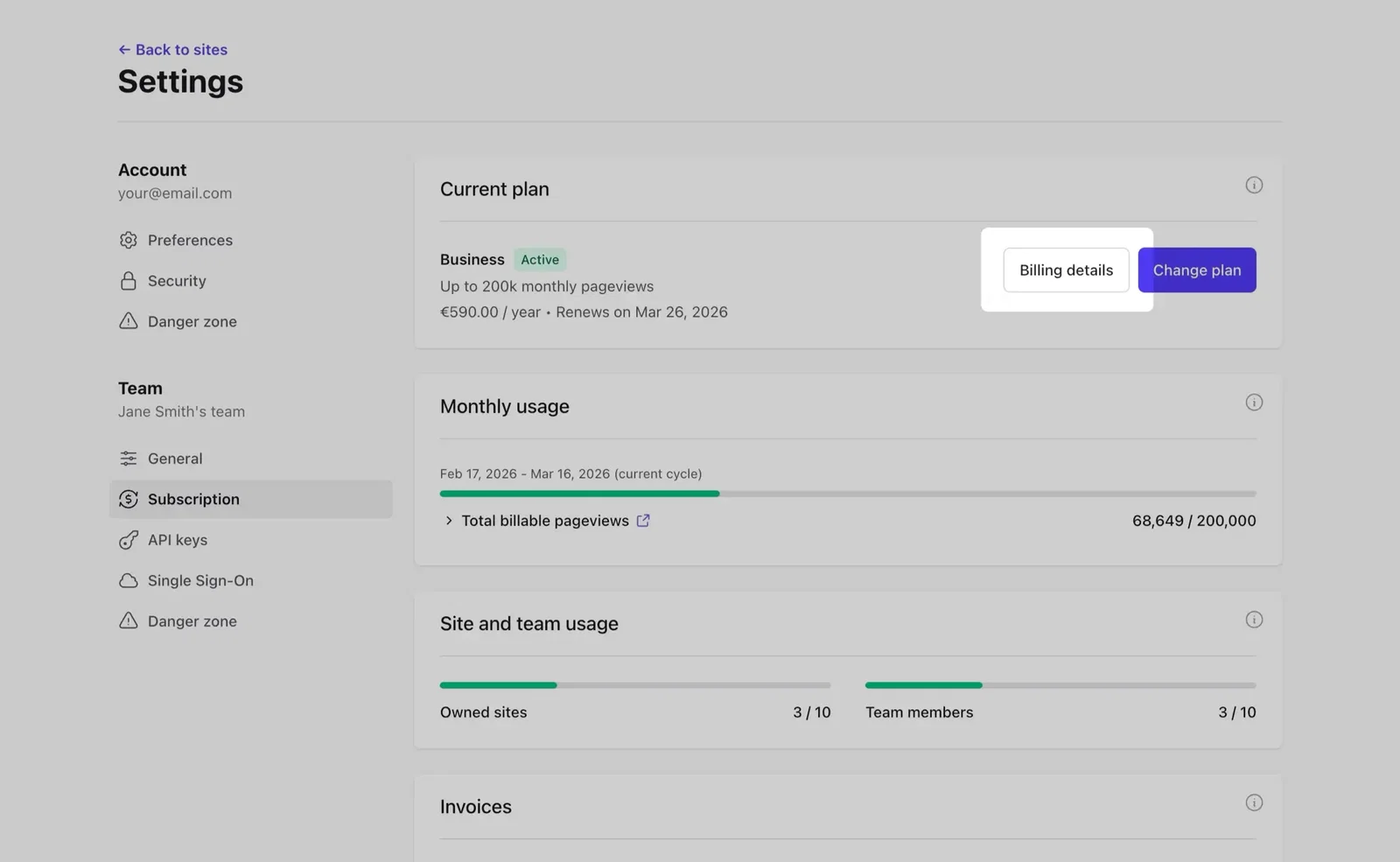
In your account settings, go to the Subscription section. Under Current plan, click Billing details.
Why did my payment fail?
Wrong or expired card details
Double-check that the card number, expiry date and CVV are entered correctly and that the card hasn't expired.
Billing address mismatch
The address you enter at checkout must match what's on file with your card issuer. Even a small difference can cause the payment to fail.
3DS authorization not completed
If your card details are correct but your bank declined the payment, the most likely cause is a missing 3DS (3D Secure) authorization. On the first payment of a recurring subscription, most banks require you to explicitly approve the charge via your banking app or a one-time code. If this authorization isn't completed within a few minutes, the bank declines the payment. This only applies to the first payment. Subsequent renewals don't require it.
Insufficient funds or spending limits
Make sure the card has enough balance to cover the charge. Some cards also have daily or monthly spending limits that can cause a decline even when funds are available.
Card blocked for online or international transactions
Some banks disable online or international payments by default. Check your banking app or contact your bank to confirm these are enabled.
Prepaid cards
Paddle does not support prepaid cards for recurring subscriptions. Use a regular credit or debit card instead.
Payment flagged by fraud prevention
Paddle's fraud protection may block a payment if it detects suspicious patterns. Common triggers include inconsistencies between your location, the card's issuing country and the billing address, or multiple payment attempts across different countries or IP addresses. If you're browsing with a VPN active, your IP location may not match your billing details and trigger a block. Try disabling your VPN before retrying.
Too many failed attempts
After several declined attempts, your bank or Paddle may temporarily block further payment attempts on that card. If this happens, wait before retrying or use a different payment method.
Browser extensions
Ad blockers and privacy extensions can interfere with the payment form. Try disabling them or completing the checkout in a different browser.
What to try
- Review all card details and make sure they're correct, including the billing address
- Check your banking app for any pending 3DS approval and complete it
- Confirm your bank hasn't blocked online or international transactions
- Disable any VPN or browser extensions before attempting payment
- If your card details are correct and no 3DS prompt was issued, try subscribing using a different email address
Change plan button missing on an Enterprise plan
If you're on a custom (Enterprise) plan, the Change plan button is hidden in the Subscription section while a payment is past due or your subscription is paused. Update your payment method under Billing details so Paddle can charge your card again. Once the payment goes through, the Change plan button is back.
Have a billing question not covered here? Contact us.
Not yet subscribed? 30 days free, no credit card required